
Website not getting enquiries? If your Swansea business website is getting visitors but very few calls, messages or quote requests, the problem may not be the amount of traffic.
The site might be failing somewhere between “someone found you” and “someone decided to contact you”. Services buried on one page, a phone number that's hard to find on mobile, or Google sending people to a generic homepage when they searched for a specific job — those are ordinary reasons, and they are fixable.
This is the conversion side of website design in Swansea. If you are still comparing build prices, start with how much a website costs in Swansea. If the site already exists, work through the issues below first.
First: traffic and enquiries are different problems
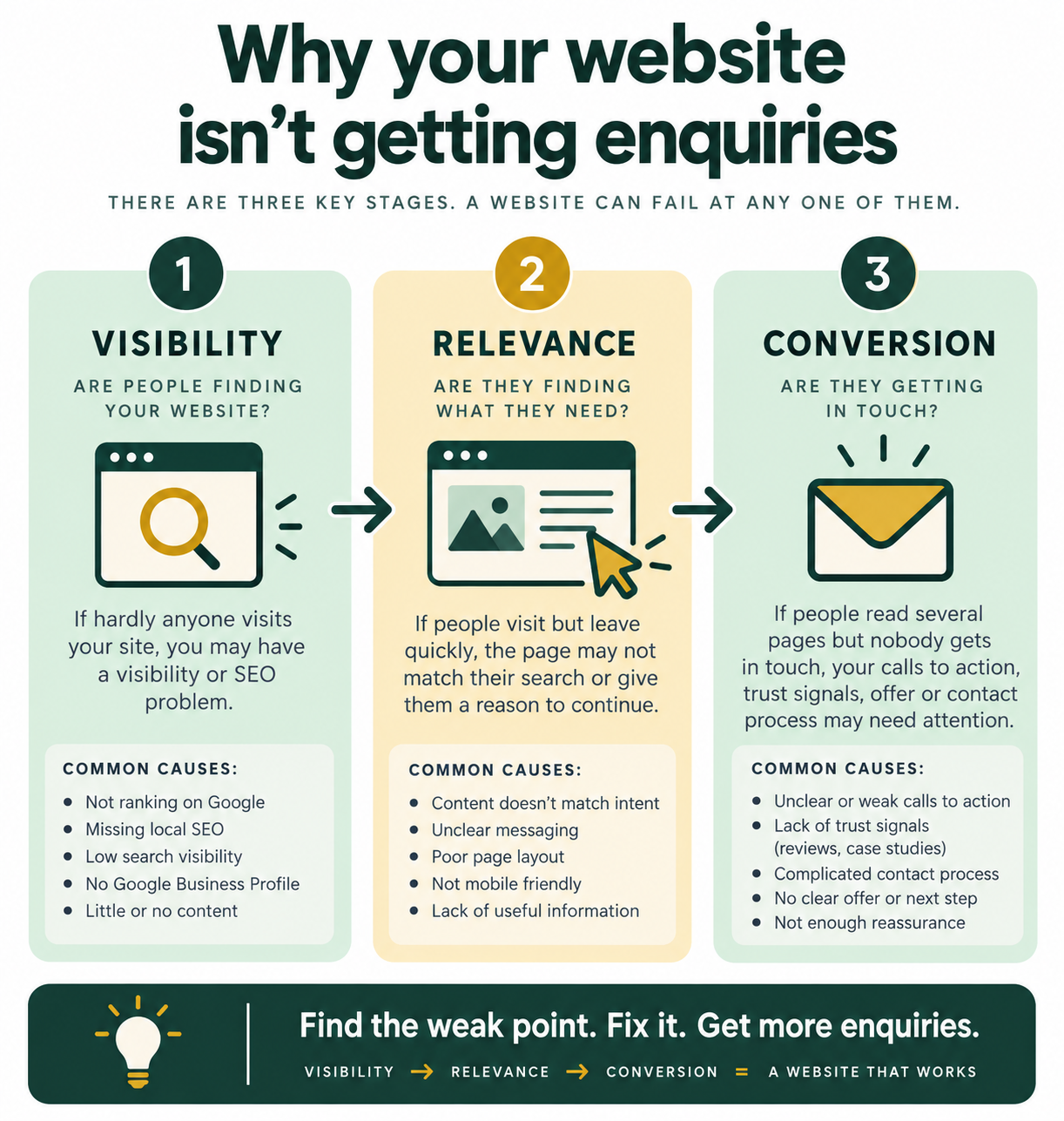
Before you change the website, work out where the problem actually sits. There are three broad stages: visibility, relevance and conversion. A website can fail at any one of them.
If hardly anyone visits, you may have a visibility or local SEO problem.
If people visit but leave quickly, the page may not match their search or give them a reason to continue.
If people read several pages but nobody gets in touch, your calls to action, trust signals, offer or contact process may need attention.
1. Your website doesn't clearly say what you do
Look at your homepage as if you've never seen the business before. Can you answer these questions within a few seconds?
- What does this business do?
- Who is it for?
- Where does it operate?
- What should I do next?
If the headline says “Quality you can trust” or “Welcome to our website”, it may sound pleasant and tell a potential customer very little.
Compare that with:
Your homepage doesn't need every detail. It does need to make the offer obvious. That's the same first-five-seconds test in the website SEO checklist.
2. Visitors can't tell whether you serve their area
Local customers want to know whether you actually work where they are. A Swansea business website should make its service area clear where it is genuinely relevant.
A domestic electrician might serve Swansea, Mumbles, Sketty and Gower. A tradesperson may cover Swansea and Neath. A salon may mainly serve people who can reach the premises.
Don't create a long list of towns simply to insert place names. Explain honestly where you work and make that easy to find.
Your Google Business Profile matters here too. Google can show your website, phone number, opening hours, service area and reviews, which helps people find and contact a local business. Official guidance is in Google’s Business Profile help.
3. There is no obvious next step
A visitor shouldn't have to hunt for a way to contact you. Give them an appropriate next step, such as:
- Call now
- Request a quote
- Book an appointment
- Check availability
- Send an enquiry
- Visit the shop
- Get directions
A roofer might want “Request a quote”. A hairdresser might want “Book an appointment”. A restaurant might want “Book a table”. A driving instructor might want “Ask about lessons”.
“Learn more” is useful when someone genuinely needs more information. It isn't always useful when someone is ready to buy. The bookings playbook in more Google bookings without ads is the same idea: one clear action.
4. Your service pages are too vague
One of the most common problems with a small business website is trying to put every service on one page.
Imagine a plumber offering boiler repairs, emergency plumbing, bathroom installations, central heating and leak detection. A single “Services” page might mention all five. Someone searching for “boiler repair Swansea” has a specific problem. They need a page that immediately confirms:
- You repair boilers
- You serve Swansea
- You understand the problem
- You can help
- Here's how to contact you
That's why service pages matter for both SEO and conversion. Google may send a searcher to the most relevant page rather than your homepage. Your website should be ready for that journey.
A useful service page can include a clear service-specific heading, a short explanation, who it's for, areas covered, what the process involves, relevant proof or reviews, FAQs, and a clear enquiry route. The local SEO and website design blueprint walks through that structure in more detail.
5. Your website is difficult to use on mobile
Try using your own website on your phone. Don't just look at it. Try to complete the action you want a customer to take.
Can you find the phone number, read the main headline without zooming, navigate the menu, see the important information quickly, complete the contact form, tap to call, and book or request a quote?
If the answer is no, you've found a conversion problem.
Google Business Profiles appear in Search and Maps and can include phone, website, hours, services and reviews. A potential customer may go from a search to your website in seconds. Don't make the final step unnecessarily difficult.
6. Your page is slow or technically unreliable
A beautiful website is no use if it takes too long to become usable. Check the site on a mobile connection rather than only on office Wi-Fi.
Look for huge image files, unnecessary animations, heavy plugins, broken links, forms that don't work, pages that return errors, and layout problems on smaller screens.
Then test the contact form. Send yourself an enquiry. Check where it arrives. Check the reply. A surprising number of websites make it harder to contact the business than the owner realises.
Google PageSpeed Insights is a useful starting point for speed. If you want a structured diagnosis, an SEO audit will tell you what to fix first.
7. There isn't enough proof or trust
Customers need reasons to trust the business, whether they're buying a £50 service or a £5,000 one.
Useful trust signals can include genuine Google reviews, case studies, photos of your work, qualifications, accreditations, years of experience, clear pricing or pricing guidance, named people, a physical location where appropriate, and clear contact details.
Show useful evidence rather than filling the page with badges. For a local roofer, photographs of completed work may be more persuasive than “we are committed to quality”. For a tutor, qualifications and a clear process may matter more. For a café, photographs, opening hours, menu information and reviews can remove uncertainty.
8. Your copy talks about you instead of the customer's problem
It's natural to write “We have been trading since…”, “We pride ourselves on…”, “Our team has…”, “We offer a comprehensive range of…”.
The customer is usually asking a different question: can you solve my problem?
A plumber's customer wants to know whether someone can fix the leak. A salon customer wants to know whether they can get the treatment they want and how much it costs. A driving instructor's customer wants to know whether lessons are available, where they operate and how to get started.
Rewrite important sections around the customer's problem, not your internal description of the business.
9. Prices, process or expectations are unclear
You don't always need to publish exact prices, but the website should answer the questions customers repeatedly ask before buying.
Depending on the business, explain how much a service starts from, how quotations work, whether you offer a free consultation, how long it usually takes, what happens after someone enquires, whether you cover their area, and what information you need before quoting.
If you don't publish prices because every job is different, say so and explain what happens instead.
“Every job is different, contact us” is less useful than: “Send us a few details and photos of the job. We'll review them and arrange a quote if we need to visit.”
For typical local build prices, see how much a website costs in Swansea — the same principle applies to your own services: explain the range, then the next step.
10. Google is sending visitors to the wrong page
This is an SEO and conversion problem at the same time.
Suppose you offer bathroom installations in Swansea and have a page called “Our Services” containing ten different services. Someone searches for “bathroom installation Swansea” and lands there. They now have to find the relevant section themselves.
A dedicated bathroom installation page can explain the service, show examples, cover the area and give a direct next step.
Google Business Profile also lets local businesses point customers to relevant website, booking and other action links. Your search visibility and your website structure should work together — that's the point of local SEO plus the site, not one or the other.
11. Your contact form creates too much friction
Look at the form. How many fields are there?
If someone only wants a quote, they probably don't need to enter a full address, date of birth, company registration number, five dropdowns, a long description, a preferred contact time and their entire life story.
Ask for what you actually need to start the conversation. For many local businesses that might be name, email or phone, what they need help with, and an optional message.
Also offer alternatives where appropriate. Some people would rather call. Others prefer WhatsApp or email.
A 10-point Swansea website self-audit
Open your website on your phone and score each statement yes or no.
- Can a new visitor tell what you do immediately? If not, rewrite the main headline.
- Is Swansea or your actual service area clear? If not, make your coverage easier to find.
- Does every major service have a useful page? If not, important services may be squeezed into one generic page.
- Is there a clear call to action? If not, decide what you want the visitor to do next.
- Can someone contact you easily on mobile? Test the phone number, form and booking process yourself.
- Does the site load and work properly? Test important pages, links and forms.
- Is there genuine proof? Add reviews, examples, qualifications, photos or other relevant evidence.
- Does the copy answer customer questions? Remove unnecessary jargon and explain what happens.
- Do Google visitors land on relevant pages? Check important queries and landing pages in Search Console.
- Does your Google Business Profile point people to useful next steps? Check website, phone, services, hours and relevant links. Google recommends keeping Business Profile information accurate and complete — see how to improve your local listing.
If you answered “no” to several of these, you may not need more traffic yet. You may need to make better use of the traffic you already have.
When does a website redesign make sense?
Not every poorly performing website needs to be replaced.
Sometimes the best solution is to improve the existing site: rewrite the homepage, create proper service pages, improve calls to action, fix mobile problems, repair forms, improve local SEO or update the Google Business Profile.
A redesign makes more sense when the existing website makes those improvements difficult — if it is hard to update, doesn't work properly on mobile, has a confusing structure, lacks important pages or was built without search in mind, rebuilding may be more practical than repeatedly patching it.
A new design won't automatically generate enquiries. The new website still needs the right structure, useful content, clear conversion paths and a plan for getting found. That's why I don't treat website design as a standalone visual exercise.
Frequently asked questions
Why is my website getting traffic but no enquiries?
Possible causes include poor page relevance, unclear calls to action, weak trust signals, mobile problems, slow pages, vague service information or a contact process that creates friction. Start by identifying where visitors land and what action you want them to take.
How do I get more enquiries from my website?
Make the service and location clear, create useful pages for important services, add genuine proof, improve mobile usability and make contacting you straightforward. You also need enough relevant search visibility to bring the right visitors to those pages.
Does my Swansea business need separate service pages?
If you offer several distinct services that customers search for separately, dedicated service pages can make sense. They give each service room to answer the specific search rather than forcing everything onto one generic page.
Does local SEO help generate enquiries?
Local SEO helps potential customers discover your business in relevant local searches. Google’s Business Profile guidance says complete and accurate information can help you appear in relevant local results. It doesn't guarantee enquiries. Your website still needs to give those visitors a good reason and an easy way to contact you.
Should I redesign my website if it isn't generating leads?
Not necessarily. Audit the existing site first. If the problems are mainly content, SEO, calls to action or trust, you may be able to improve it without a full redesign. If the structure or technology is holding everything back, rebuilding may make more sense.
What's the difference between website traffic and enquiries?
Traffic means people arrived. Enquiries mean they took the next step. You can rank, get clicks, and still get no calls if the page does not match the search, look trustworthy, or make contact obvious on a phone.
Want this looked at for your business? Get in touch or message me on WhatsApp.